
How to Print Punjab e-Stamp Paper From Home or Office Online is the ultimate solution for citizens who want to avoid traditional, time-consuming methods of obtaining legal documents. In the past, even a simple Rs. 300 affidavit required visiting the Bank of Punjab, standing in long queues, and often dealing with agents. However, with the digital transformation introduced by the Punjab Land Records Authority, the entire process can now be completed from your computer. Learning this method not only saves time but also ensures your documents are authentic and easily verifiable through a secure QR code system.
Table of Contents
ToggleThe Evolution of e-Stamping in Punjab
The Government of Punjab has undergone a massive digital transformation over the last few years. The primary goal was to eliminate the “paper culture” that often led to forgery and corruption. By introducing the e-Stamping portal, the government has streamlined the process for both high-denomination (property transfers) and low-denomination (affidavits, contracts) stamp papers.
When you understand how to print Punjab e-Stamp paper from home or office online, you are participating in a modern ecosystem that values transparency. This system is linked directly to the PITB (Punjab Information Technology Board) infrastructure, ensuring that every PSID generated is unique and traceable.
Why Choose Online e-Stamping?
Before we dive into the step-by-step instructions on how to print Punjab e-Stamp paper from home or office online, it is important to understand the benefits of this digital shift:
- 24/7 Availability: You are no longer restricted by bank timings. You can generate a challan at midnight and print it the next morning.
- No Hidden Charges: You pay exactly the amount mentioned on the challan (e.g., Rs. 300) without paying extra commissions to stamp vendors.
- Verification: Each paper comes with a unique 16-digit number and a QR code that any legal authority can verify instantly.
- Multiple Payment Options: The integration of 1Link allows users to pay via mobile apps, ATMs, or internet banking.
Pre-Requisites for Printing your e-Stamp Paper
To successfully execute the process of how to print Punjab e-Stamp paper from home or office online, ensure you have the following ready:
1. A stable internet connection.
2. Your original CNIC and the CNIC of the second party (if applicable).
3. An active mobile number to receive the Stamp Number and OTP.
4. Access to a digital payment app like Easypaisa, JazzCash, or a bank app.
5. A high-quality laser or inkjet printer with A4 size paper.
Step-by-Step Guide: How to Print Punjab e-Stamp Paper From Home or Office Online
Follow these detailed steps to complete your task without any technical glitches.
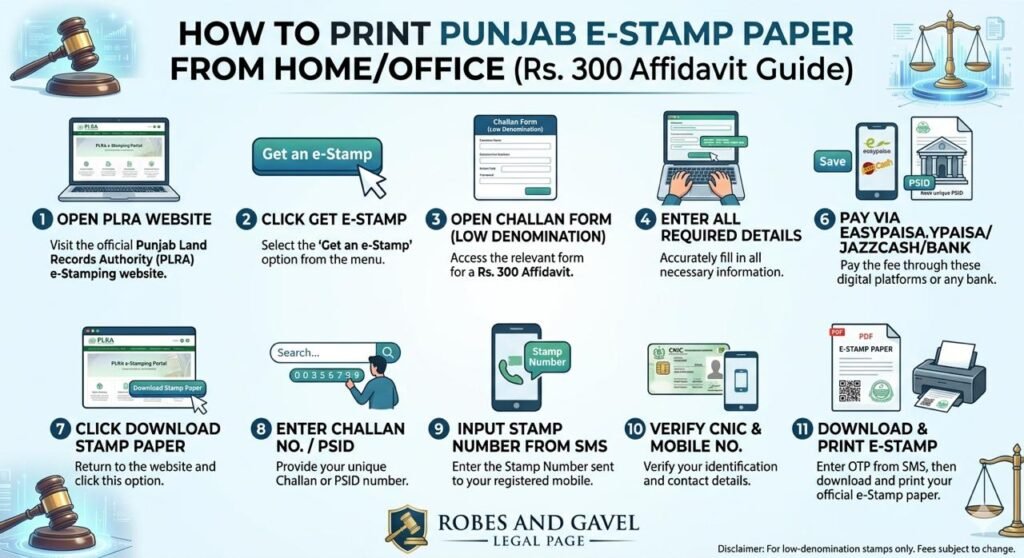
1: Accessing the Official Portal
The journey of how to print Punjab e-Stamp paper from home or office online begins at the official e-Stamping website managed by the PLRA. Once the page loads, you will see various options for different types of stamps. For a standard Rs. 300 affidavit, you must focus on the “Low Denomination” category.
2: Selecting the Get an e-Stamp Option
On the homepage, look for the button labeled “Get an e-Stamp.” Clicking this will redirect you to a page where you must choose between judicial and non-judicial stamps. Most common affidavits for jobs, school admissions, or minor contracts fall under non-judicial low-denomination stamps.
3: Filling the Challan Form (Low Denomination)
This is the most critical part of how to print Punjab e-Stamp paper from home or office online. You will be asked to fill in:
- District and Tehsil: Where the stamp will be used.
- Purpose of Stamp: Select “Affidavit” or the relevant legal category.
- Agent/Applicant Details: Enter your name and CNIC.
- First Party & Second Party Details: Ensure names and CNIC numbers match the official records.
4: Saving the Form and Generating PSID
Once the data is entered, click “Save.” The system will generate a PSID (Payment System Identifier). This 17-digit number is your key to making the payment. You can print the challan or simply note down the PSID.
5: Making the Payment via Digital Apps
The convenience of how to print Punjab e-Stamp paper from home or office online lies in the payment. Open your Easypaisa or JazzCash app:
- Go to “Bill Payments.”
- Select “Government Payments” or “Punjab e-Stamping.”
- Enter your PSID.
- Verify the amount (Rs. 300) and confirm the transaction.
6: Downloading the Stamp Paper
After payment, return to the e-Stamping Punjab Portal. Look for the “Download Stamp Paper” option. You will need to provide:
- Your Challan Number / PSID.
- The Stamp Number sent to your mobile via SMS.
- Your CNIC and Mobile Number.
7: Authentication via OTP
To ensure security, the system will send a One-Time Password (OTP) to your registered mobile number. Enter this code into the website. Once verified, a PDF file of your e-Stamp paper will be ready for download.
8: Printing the Final Document
The final step in how to print Punjab e-Stamp paper from home or office online is the physical print. Open the PDF and use a printer. It is recommended to use 80gsm or 100gsm A4 paper to give the document a professional feel.
Common Issues and Troubleshooting
While learning how to print Punjab e-Stamp paper from home or office online, you might encounter a few hurdles. Here is how to solve them:
- Delayed SMS: Sometimes the Stamp Number or OTP is delayed due to network congestion. Wait for 5-10 minutes before requesting a resend.
- Payment Status Not Updated: If you have paid but the website says “Unpaid,” wait for 15 minutes for the 1Link system to sync with the PLRA database.
- Wrong Information: If you have generated a PSID with the wrong name but haven’t paid yet, simply let that challan expire and create a new one. If you have already paid, you may need to visit the nearest e-Stamping office for a refund or correction.
The Legal Validity of e-Stamp Papers
A common question people ask when learning how to print Punjab e-Stamp paper from home or office online is whether these papers are as valid as the old yellow stamp papers. The answer is a resounding Yes.
Under the Punjab Stamp Act, these digitally generated papers are the only legal way to issue stamps now. In fact, they are safer because:
1. They cannot be backdated.
2. The record is stored permanently in the Government of Punjab’s cloud servers.
3. Any lawyer or notary public can verify the authenticity of your document by scanning the QR code using the “e-Stamping” mobile app.
Best Practices for Robes and Gavel Clients
At Robes and Gavel, we encourage our clients to embrace technology. When you know how to print Punjab e-Stamp paper from home or office online, you take control of your legal affairs.
- Double-Check CNICs: A single digit error in the CNIC can make the affidavit void in court.
- Keep Digital Copies: Always save the PDF on your Google Drive or email so you can reprint it if the physical copy is lost.
- Use High-Quality Printers: Ensure there are no ink smudges on the QR code or the 16-digit stamp number.
Conclusion
Mastering the art of how to print Punjab e-Stamp paper from home or office online is a vital skill in modern-day Pakistan. It represents the shift towards a “Digital Punjab” where services are delivered at the doorstep. By following the 11-step process outlined in this blog, you can save hours of manual labor and ensure that your legal documents are 100% authentic and state-approved.
Whether you are a student needing an affidavit for a degree or a businessman signing a rental agreement, knowing how to print Punjab e-Stamp paper from home or office online puts the power of the law in your hands.
The Government of Punjab, through the Punjab Land Records Authority, has made it incredibly simple. Now, it is up to the citizens to utilize these tools for a more efficient and transparent legal system. How to print Punjab e-Stamp paper from home or office online is no longer a mystery, it is a standard procedure that every citizen should be familiar with.